A safe box beeps primarily due to low batteries, which account for over 80% of such issues, or because it has entered a lockout mode after multiple incorrect code entries. Other causes include keypad malfunctions, system errors, or physical obstructions. Addressing these issues often involves replacing batteries, waiting out lockout periods, or consulting the user manual for specific error codes.
Understanding Your Safe’s Beeps
Modern safe boxes, especially electronic models, use sophisticated systems to communicate their status through various alerts, including beeping. These audible signals are crucial indicators, warning you about potential issues that could compromise security or functionality. It’s important to distinguish between routine operational sounds, like keypad presses, and alert beeps that signal a problem. While a quick “beep” confirms a button press, a continuous or patterned beeping often points to an underlying issue.
Common Reasons Your Safe Box is Beeping
Several factors can cause your safe box to start beeping unexpectedly. Identifying the specific cause is key to troubleshooting effectively.
Low Battery: The Most Frequent Culprit
By far the most common reason for a safe box to beep is a low battery. Electronic safes rely on battery power for their keypads, locking mechanisms, and internal systems. As batteries drain, the safe often emits warning beeps to alert you before they die completely, preventing a lockout.
Signs of a low battery include:
- An unresponsive keypad or delayed response when entering your code.
- A dim or non-existent display on safes equipped with a digital screen.
- Delayed unlocking after the correct code has been entered.
- A longer series of beeps when attempting to open the safe.
- Some models may even show a specific low battery icon.
Typically, safe box batteries have an average lifespan of one to two years, depending on usage. If your batteries haven’t been replaced within this timeframe, a low power warning is highly likely.
Incorrect Code Entries and Lockout Mode
Many electronic safes feature a security protocol that activates a “lockout mode” after multiple incorrect code entries. This is a protective measure against unauthorized access. During this lockout period, the safe may emit a distinctive beeping pattern and become temporarily unresponsive, even to the correct code. The duration of this lockout can vary by model, from a few minutes to much longer periods.
Keypad or Electronic Lock Malfunction
Beyond simple battery issues, the electronic lock or keypad itself can fail, leading to persistent beeping. This could be due to internal circuit board damage, a faulty solenoid (the component that physically engages and disengages the locking bolts), or general wear and tear. In such cases, the safe might beep continuously, or beep even after you’ve entered the correct code, yet remain locked. Replacing the entire keypad or internal mechanism might be necessary.
System Issues or Sensor Malfunctions
|
Our Picks for the Best Safe Box in 2026
As an Amazon Associate I earn from qualifying purchases.
|
||
| Num | Product | Action |
|---|---|---|
| 1 | SentrySafe Black Fireproof and Waterproof Safe, File Folder and Document Box with Key Lock, Ex. 14.3 x 15.5 x 13.5 inches, HD4100 |

|
| 2 | Amazon Basics Steel Security Safe and Lock Box with Digital Keypad, Easy to Use, Removable Shelf, Secure Cash, Jewelry, Documents, Black, 1.2 Cubic Feet, 16.9-x-14.6-x-10.6-inches (WxDxH) |
|
| 3 | KYODOLED Fireproof Document Box with Key Lock, Small Lock Boxes for Personal Items, Fire and Water Resistance, Fireproof Safe Box for Documents, Jewelry, Passport, Cash, 12.6'' x 8.3'' x 4.3'' Black |
|
| 4 | SentrySafe Fireproof Safe Box with Key Lock, Chest Safe with Carrying Handle to Secure Money, Jewelry, Documents, 0.25 Cubic Feet, 6.3 x 15.3 x 12.1 Inches, 1160 |
|
| 5 | DocSafe 5200°F Document Organizer with Lock, Upgraded Heat Insulated Fireproof&Water-Resistant Box 8 Layers File Organizer, Portable Home Travel Safe Storage for Important Documents and More |
|
| 6 | KYODOLED Cash Box with Combination Lock Safe Metal Money Box with Money Tray for Security Lock Box 7.87"x 6.30"x 3.35" Black |
|
| 7 | Yuanshikj Safe Box with Key Lock, Steel Security Lock Box, 0.23 Cubic Feet, 9.1" W x 6.7" D x 6.7" H, Small Hidden Safe for Home Office Cash Jewelry Storage (BLACK) |
|
| 8 | SentrySafe Fireproof Safe with Key Lock, Chest Lock Box for Home or Travel Secures Money, Documents, 0.18 Cubic Feet, 6.1 x 14.3 x 11.2 Inches, 1210 |
|
| 9 | Amazon Basics Steel Security Safe and Lock Box with Electronic Keypad, Secure Documents Storage, Black, 0.5 Cubic Feet, 13.8" W x 9.8" D x 9.8" H, Removable Shelf |
|
| 10 | Amazon Basics Steel Home Security Safe Box with Electronic Keypad Lock for Documents, Jewelry, Valuables, 1.8 Cubic Feet, Black, 13.8"W x 13"D x 19.7"H |
|
While more common in integrated home security systems, some advanced safe boxes may also incorporate sensors that monitor conditions like tampering, extreme temperatures, or even communication status. A beep could indicate a triggered sensor, a loss of power to auxiliary features, or a communication failure with a linked security system.
Physical Obstructions or Misalignment
Though less common for beeping, a physical obstruction or misalignment within the safe’s door or locking mechanism can cause resistance, which in rare cases might trigger a system alert or interfere with the locking process. This could occur if the safe is on an uneven surface or if debris is blocking the bolt work.
Quick Fixes and Troubleshooting Steps
When your safe box starts beeping, staying calm and methodically troubleshooting the issue can often resolve the problem without needing professional help.
Step 1: Replace the Batteries
This is the most critical and often overlooked first step.
- Locate the Battery Compartment:
- External Compartment: Many safes have an external battery compartment, often a small tray or panel near or under the keypad, or on the outside of the safe door. Some may require a small screwdriver to open.
- Internal Compartment: For some safes, particularly those with a key override, the batteries might be located inside the safe, requiring the override key to open it first.
- Keypad-Integrated: Higher-end locks might have the batteries concealed directly within the keypad itself, accessible by tilting the keypad forward or removing a cover.
- Identify Battery Type: Most electronic safes use standard AA or 9V alkaline batteries. Always refer to your safe’s manual to confirm the correct type.
- Replace with New, High-Quality Batteries: Use only fresh, high-quality alkaline batteries. Avoid mixing old and new batteries or different brands.
- Ensure Correct Installation: Pay close attention to the polarity (+ and – terminals). Incorrect placement or loose batteries can prevent the safe from functioning.
- Re-test: After replacing, try entering your code. If the safe still doesn’t respond or continues to beep, recheck the battery installation, try a different set of new batteries (as sometimes even new batteries can be faulty), and gently clean the battery contacts with a dry cloth to remove any dirt or corrosion.
> “Over 80% of safe beeping issues we encounter are resolved simply by replacing the batteries. It’s always the first thing we advise customers to check.” – Sarah Jenkins, Certified Safe Technician
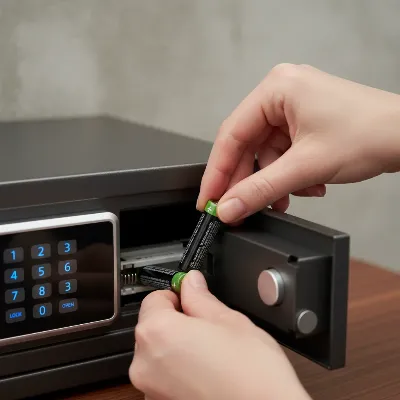 A close-up image of a person replacing batteries in an electronic safe's external compartment.
Step 2: Check for Error Codes or Messages
If your safe has a digital display, look for any error codes or messages immediately after the beeping starts or after attempting to enter your code. These codes are designed to provide specific information about the problem. Consult your safe’s user manual to decipher these codes and understand the recommended course of action. Some systems may allow you to clear these alerts by pressing a specific button (e.g., ‘Status’ or ‘Clear’).
Step 3: Silence the Alarm (Temporarily)
Many safe boxes and security panels offer a temporary silence function for beeping alerts. This can provide a respite from the noise while you work on the root cause.
- Keypad Entry: For some models, simply re-entering your master code, arming and then disarming the system, or pressing a ‘Status’ or ‘Silence’ button on the keypad might temporarily quiet the beeping.
- Mobile App/Touchscreen: More advanced systems might allow you to silence alerts via a dedicated mobile application or directly on a touchscreen panel by acknowledging the trouble notification.
- Manufacturer-Specific Commands: Certain brands have specific key combinations (e.g., “11#” or “*2#”) to silence or even disable keypad beeps permanently. Refer to your manual or the manufacturer’s website for model-specific instructions. Silencing the beep is often a temporary measure; the underlying problem still needs addressing.
Step 4: Wait Out Lockout Mode
If you suspect the beeping is due to multiple incorrect code entries, simply wait. Most safes will automatically reset after a predetermined lockout period (e.g., 5, 10, or 15 minutes). Avoid pressing more buttons during this time, as it might reset the lockout timer. Once the lockout period expires, try entering your correct code carefully.
Step 5: Inspect for Physical Issues
Visually inspect your safe box for any obvious physical problems.
- Level Surface: Ensure the safe is resting on a level, stable surface. Unevenness can cause minor misalignments in the door or locking mechanism.
- Obstructions: Check for any debris, objects, or damage around the safe door, hinges, or bolt work that might be preventing it from closing or operating smoothly.
- Gentle Nudge: In some cases, if batteries are very low, a gentle tap or “bumping” on the top of the safe while entering the code might provide just enough vibration to assist a struggling solenoid in opening the lock. This is generally a last-ditch effort before calling a professional.
Step 6: Consult Your Safe’s User Manual
Your safe’s user manual is an invaluable resource. It contains specific information about your model’s battery type, replacement instructions, troubleshooting codes, and specific methods for silencing alerts or overriding locks. Keep it in an easily accessible place outside of your safe.
When to Call a Professional
If you’ve exhausted all troubleshooting steps and your safe box continues to beep or remains locked, it’s time to call in the experts.
- Persistent Issues: If the beeping doesn’t stop, or the safe won’t open after battery replacement and other fixes, there might be a more complex internal issue.
- Electronic Lock Failure: If you suspect the electronic lock or solenoid has genuinely failed (e.g., 5 beeps after entering the correct code, but no unlock), a locksmith specializing in safes or the manufacturer will have the tools and expertise to address it. Attempting to force the safe open yourself can cause irreversible damage.
- Lost Keys or Combinations: If you’ve lost your override key or forgotten your combination, only a professional can help you regain access without damaging the safe.
Maintaining Your Safe Box to Prevent Beeping
Preventative maintenance can significantly reduce the likelihood of your safe box beeping unnecessarily.
- Regular Battery Replacement: Make it a habit to replace your safe’s batteries annually, or every two years at most, even if there’s no low battery warning. Mark it on your calendar.
- Cleanliness: Keep the keypad and surrounding areas clean and free of dust or debris.
- Secure Installation: Ensure your safe is installed on a stable, level surface to prevent any mechanical stress on the locking mechanism.
- Manual Accessibility: Always know where your safe’s user manual is located.
- Test Periodically: If you don’t use your safe frequently, make a point to open and close it, and test the code, every few months to ensure it’s functioning correctly.
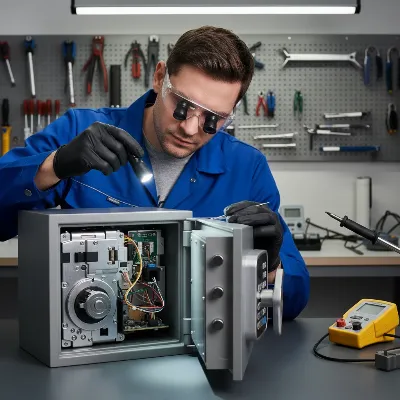 An expert technician performing maintenance on a safe box, checking its internal components.
Conclusion
A beeping safe box can be alarming, but in most cases, it’s a simple call for attention, primarily due to low batteries. By systematically checking the power source, looking for error indicators, and consulting your user manual, you can often diagnose and fix the problem yourself. A well-maintained safe is a silent, secure safe. Regular battery replacement and a basic understanding of your safe’s functions are your best defense against unexpected beeps and potential lockouts. If your efforts don’t resolve the issue, don’t hesitate to seek assistance from a qualified professional to ensure your valuables remain protected.
When was the last time you checked your safe box’s batteries?
Frequently Asked Questions
Can a safe beep if the battery is completely dead?
No, if a safe’s battery is completely dead, it typically won’t have enough power to emit any sound, including beeps. Beeping usually indicates that the battery is low but still has enough charge to power the warning system. When the battery is totally depleted, the keypad will likely be unresponsive, and the safe will not open.
How often should I change the batteries in my safe?
It is generally recommended to replace the batteries in your electronic safe every 12 to 24 months, even if you haven’t received a low battery warning. This proactive approach helps prevent unexpected lockouts due to battery depletion and ensures reliable operation. Consider setting a yearly reminder for this important maintenance task.
What if my safe beeps continuously and won’t open?
A continuously beeping safe that won’t open, even with new batteries, suggests a more significant issue, such as an electronic lock malfunction or a problem with the internal solenoid. In this situation, consult your safe’s user manual for specific troubleshooting steps or contact the manufacturer or a certified locksmith. Avoid attempting to force the safe open, as this could cause irreparable damage.
Frequently Asked Questions
Why does my electronic safe box keep beeping?
Your electronic safe box most commonly beeps due to low batteries, which account for over 80% of reported issues. Other reasons include entering lockout mode after too many incorrect code attempts, or a malfunction in the keypad or electronic lock mechanism. Always check the battery first.
Can a safe beep if the battery is completely dead?
No, if a safe's battery is completely dead, it typically won't have enough power to emit any sound, including beeps. Beeping usually indicates that the battery is low but still has enough charge to power the warning system. When the battery is totally depleted, the keypad will likely be unresponsive, and the safe will not open.
How often should I change the batteries in my safe?
It is generally recommended to replace the batteries in your electronic safe every 12 to 24 months, even if you haven't received a low battery warning. This proactive approach helps prevent unexpected lockouts due to battery depletion and ensures reliable operation. Consider setting a yearly reminder for this important maintenance task.
What if my safe beeps continuously and won't open?
A continuously beeping safe that won't open, even with new batteries, suggests a more significant issue, such as an electronic lock malfunction or a problem with the internal solenoid. In this situation, consult your safe's user manual for specific troubleshooting steps or contact the manufacturer or a certified locksmith. Avoid attempting to force the safe open, as this could cause irreparable damage.
What are the signs of a low battery in an electronic safe?
Signs of a low battery in an electronic safe include an unresponsive or delayed keypad, a dim or non-existent digital display, delayed unlocking after entering the correct code, and a longer series of beeps when attempting to open the safe. Some models may also show a specific low battery icon.
When should I call a professional for a beeping safe?
You should call a professional if your safe continues to beep or remains locked after you've replaced the batteries and tried all troubleshooting steps. This includes persistent issues, suspected electronic lock failure (e.g., 5 beeps with no unlock), or if you've lost override keys or forgotten your combination. Professionals can resolve complex internal issues without damaging the safe.
Fix a Beeping Safe Box
Troubleshoot and resolve common beeping issues with your electronic safe box, from battery replacement to checking for error codes and physical obstructions.
Locate the battery compartment, identify the correct battery type (usually AA or 9V alkaline), and replace them with new, high-quality batteries. Ensure correct polarity and re-test the safe. Over 80% of beeping issues are resolved by this step.
If your safe has a digital display, look for any error codes or messages. Consult your safe's user manual to understand these codes and the recommended actions. Some systems allow clearing alerts by pressing a 'Status' or 'Clear' button.
If you suspect the beeping is due to multiple incorrect code entries, wait for the safe's predetermined lockout period (e.g., 5, 10, or 15 minutes) to expire. Avoid pressing more buttons during this time, as it might reset the lockout timer.
Visually inspect your safe box for any obvious physical problems. Ensure the safe is on a level surface and check for debris or obstructions around the door, hinges, or bolt work that might prevent smooth operation. A gentle tap might help a struggling solenoid if batteries are very low.
Refer to your safe's user manual for specific information about battery type, replacement instructions, troubleshooting codes, and methods for silencing alerts or overriding locks. The manual is an invaluable resource for model-specific guidance.
Get our weekly buyer guide
Practical specs, not advice. Unsubscribe anytime.

I was so frustrated with my safe constantly beeping, and I thought it was broken for good. Turns out, it was just the low batteries like mentioned here! Swapped them out, and it’s been silent ever since. Such a simple fix, but I wouldn’t have thought of it without these tips. Definitely saved me from calling a locksmith.
This was a lifesaver! My electronic safe started a continuous beeping pattern, and I was worried about a major system error. Following the advice to check for physical obstructions around the keypad actually solved it. A small piece of debris was causing the issue. So glad I didn’t have to go through the hassle of contacting customer service.
My safe was beeping like crazy, and I was sure it was the lockout mode because I kept messing up the code. Waited the recommended time, and it did reset, which was a relief. However, I still wish the manual was clearer about how long the lockout actually lasts for my specific model. It’s a bit vague, but the advice here helped me figure it out.
I’ve had my safe for years and never had an issue until recently when it started making these weird alert beeps. I learned from this that distinguishing between routine operational sounds and actual problem alerts is key. It helped me realize it wasn’t just a button press sound, but a real warning. Replaced the batteries, and it’s back to normal.